
This is an old revision of the document!
Table of Contents
LuaAutomation ATC rail
 Do anything you want with ATC rails.
 This is a draft. Please improve this page by creating relevant pages, adding information and references to internal or external sources.
Note: this page has been written for Advtrains 2.0.1 TSS and Minetest 5.1.0. Examples and practices described in this page don't take advantage of improvements introduced in later releases.
Properties
Mod: advtrains_luaautomation
Node name: advtrains_luaautomation:dtrack_placer
Other names:
advtrains_luaautomation:dtrack_stadvtrains_luaautomation:dtrack_st_30advtrains_luaautomation:dtrack_st_45advtrains_luaautomation:dtrack_st_60
Craft recipe
This node has no craft recipe.
Extended description
- When the rail is first built, this rail node does nothing. But once right-clicking (or double tapping on Android) the node, a formspec displays, allowing you to write Lua code for the current node.
- Interacting with the ATC rail requires the
atlatcprivilege. - The code in the ATC rail is executed when an event is fired. See Events for a list of events this node supports.
- This node can be rotated by the Trackworker.
- Only straight nodes are supported. You can't put this node on a curve or as a switch.
- This node is an active component.
Environments
Each active component is assigned to an environment. This is where all data are held. Components in different environments can't interfere with each other.
Note: the Environments and Coding guide sections also apply to the LuaAutomation operation panel.
Creating an environment
Main article: /env_create
An environment is created by using /env_create. We pass to this command the name of the environment to create. While this name may contain whitespaces and symbols, it is highly recommended that you use only uppercase, lowercase letters and underscores.
Setting up an environment
Main article: /env_setup
You've created your first LuaATC environment! If you execute /env_setup <your_env_name> in the chat window, you get a formspec like this:
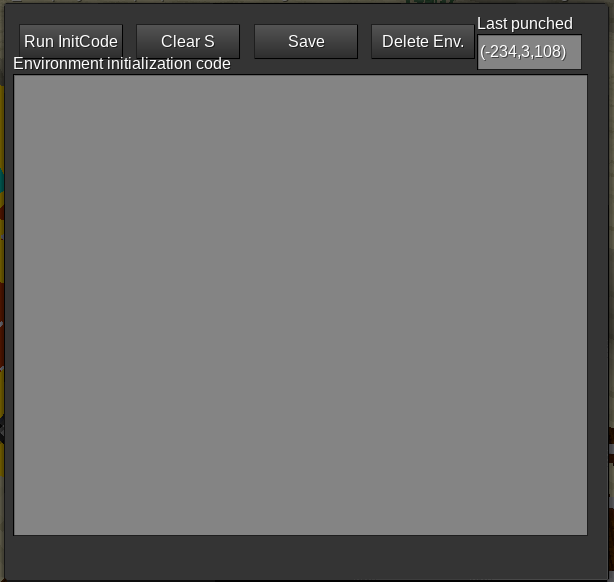
It allows you to edit your environment initialization code.
- The button “Run InitCode” runs immediately the initialization code.
- The button “Clear S” removes all elements from the
Stable. - The button “Save” saves the initialization code for the current environment.
- The button “Delete Env.” is to delete your environment. This may happen when you accidentally created the environment or you no longer need it. You will be asked to confirm by typing YES (in uppercase) into a second formspec. Once it is deleted, all data associated to the environment is lost and can't be recovered.
When the init code fails to execute, the F table is restored to previous state.
More information on how to use that initialization code to do amazing things is given below.
Coding guide
Predefined global variables
The following global variables are available inside a LuaAutomation ATC rail:
S
A table shared between all components of an environment. Its contents are persistent over server restarts. Any value is allowed, except functions:
Do not store functions in this table. Calling them from another component may work, but they will be discarded on server shutdown and this may lead to unexpected results.
F
A table shared between all components of an environment. Its contents are discarded on server shutdown or when the init code gets re-run. Any value is allowed, even functions.
This table is not made to store data, but to provide static value and function definitions. This table should be populated by the initialization code.
Available Lua functions
The standard Lua globals are available in the LuaATC environment:
stringmathtableos
The standard Lua functions are available in the LuaATC environment:
asserterroripairspairsnextselecttonumbertostringtypeunpack
LuaAutomation-specific functions
In the following functions, all parameters named pos designate a position. You can use either:
- a default Minetest position vector (like
{x=34, y=2, z=-18}) - the
POS(34,2,-18)shorthand - a string, the name of a passive component.
POS(x, y, z)
A shorthand function to designate a Minetest position vector like {x=?, y=?, z=?}.
getstate(pos)
Gets the state of a passive component at position pos. The returned states are component-specific, but it is more likely to be a string.
setstate(pos, new_state)
Sets the state of a passive component at position pos to the value new_state. The possible states are component-specific, but it is more likely to be a string.
is_passive(pos)
Checks whether there is a passive component at position pos. If pos is a string, checks whether the passive component with the specified name exists.
interrupt(time, message)
Causes the LuaAutomation mod to trigger an int event (the Advtrains equivalent of Mesecons' interrupt) on this component after the given time, in seconds, with the specified message. message can be of any Lua data type.
This function is not available in init code.
interrupt_pos(pos, message)
Triggers immediately an ext_int event on the active component at pos (can't be a string). message can be of any Lua data type.
Use with care! This may lead to expotential growth of interrupts.
digiline_send(channel, message)
Sends a digiline message on the specified channel.
This function is not available in init code.
Trivia
The LuaAutomation ATC rail has the same texture as the ATC controller rail, but its functions are different.